Posts

Showing posts with the label 3D Animation

Walk Cycle Animation

Image
Hello everyone! Another animation assignment today. We were told to animate a static walk cycle, with a little acting. I chose the skip walk. A happy walk with a bit of a hop. Here are the videos that show the progress of the animation: Planning: Blocking: Linear: Final: Thank you for visiting! Bye! ~~~~~~~~Chinmayee. S

Fight Animation

Image
Hello everyone! I'm back with another assignment. We were to animate a fight scene between two characters. We had to apply the principles of weight, drag and follow through to get a good result. Here is the final output of the animation: I took references from Avatar: The last Air-bender, Jackie Chan the animated series, and a few fight poses online. Thanks for visiting! Bye!! ~~~~~~~Chinmayee. S

Squirrel Animation

Image
Hello everyone! In this assignment, we were given the model of a simple squirrel which was rigged. We were told to make a small animation with it. First step: Planning the shot. Second step: Blocking in Maya Third step: Polished animation This step involves editing the graph of the animation. Only the Body's graph is edited in this video. That's it for now! Thanks for visiting! Bye...! ~~~~~~~Chinmayee. S

Bouncing Ball 3D Animation

Image
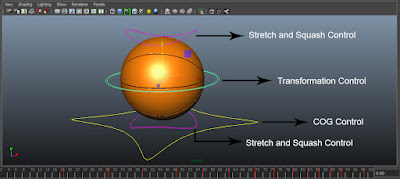
Hello Everyone! This is my first 3D animation. Ball bounce is the animation which forms the basis of all other animations. We were given a ball that was already rigged and told to animate ball bounce. This ball had 4 controls: 1. up_ctrl (stretch and squash control 1) 2. transform_ctrl 3. down_ctrl (stretch and squash control 2) 4. COG_ctrl Using the Transform control, you can move the ball around. I moved the ball in X-axis and made it bounce on Y-axis. Then I made it rotate in the Z-axis. Here is the graph for the Transform control: X-axis: Y-axis: Z-axis: Using the steep-to-curve and curve-to-steep method, editing the graph gave slow in and slow out effect. The Stretch and Squash controls helps you to give the ball the stretch and squash effect, making it look more appealing. Here are the graphs for the controls: Up control X-axis: Up control Y-axis: Down control X-axis: Down control Y-axis: ...