Hello everyone! Here is a compilation of all my rigging assignments. There are a few new ones at the end. Hope you like them...! Thanks for watching! Bye...! ~~~~~~~Chinmayee. S
Hello everyone, Here is the final compilation of all the dynamics assignments. It consists of many segments, like Dynamics Rigid-body, Soft-body, Fluids, nDynamics particles, instancing etc. Hope you enjoy the simulations! Thanks for watching! Bye!! ~~~~~~~~Chinmayee. S
Hello everyone! Another animation assignment today. We were told to animate a static walk cycle, with a little acting. I chose the skip walk. A happy walk with a bit of a hop. Here are the videos that show the progress of the animation: Planning: Blocking: Linear: Final: Thank you for visiting! Bye! ~~~~~~~~Chinmayee. S
Hello everyone! I'm back with another assignment. We were to animate a fight scene between two characters. We had to apply the principles of weight, drag and follow through to get a good result. Here is the final output of the animation: I took references from Avatar: The last Air-bender, Jackie Chan the animated series, and a few fight poses online. Thanks for visiting! Bye!! ~~~~~~~Chinmayee. S
Hello everybody! Here is another rigging assignment. We were given the model of Bruce the shark. This is a new type of rig. The previous ones were robotic, hence there was no need for skinning. But this is a living being and is made of one single polygon. Hence we had to skin it. Here is the final video: Thank you for visiting! See you soon. Bye!! ~~~~~~~Chinmayee. S
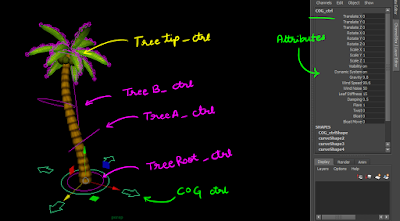
Hello everyone! I'm back again with another Prop rig. This time, we were given a tree model and told to rig it in such a way that it is able to twist and flare together, the leaves react to the environment etc, Here is the set up: We used nhair to make the leaves move according to gravity. Here is the final output: Thanks for visiting! Bye...! ~~~~~~~Chinmayee. S
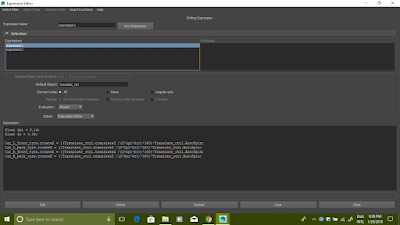
Hello guys! Here is another assignment for the subject Rigging techniques. We had to rig the car wheels in such a way that it would automatically rotate as we move the car forward or backward. We also had to make the car vibrate when in idle state and the engine is still switched on. So we added two different formulas in the expression editor for it. This is for wheel auto rotate: This is for the engine idle state: Here are the controls: Here is the final result: Thank you for visiting! Bye...!! ~~~~~~~~Chinmayee. S
Hello Everyone! This is a Character Rigging assignment. We rigged a robot called Tony by using reverse foot log method. Here is the final rig: Here is the rig set-up: That's all for now! Thanks for visiting! Bye...!! ~~~~~~~Chinmayee. S
Hello! This is another Rigging techniques assignment. We were given a book model and told to rig it so that the book could be folded and the pages could be flipped. Here is the final rig: Here is what it looks like: Here is the expression used for the page fanning effect: Thank you for visiting! Bye...! ~~~~~~~Chinmayee. S
Hello! This is a rigging assignment. We were given the model of a juice box for which we had to create a rig. Here is the video: We used driven key to control the squash and stretch, bend and twist of the box when the control curse is moved. We constrained the straw using a locator and point to poly contain. And lastly, we created a translate control to which sip value was given. All these were parented to the world control. That's all Thanks for visiting!! Bye...!! ~~~~~~Chinmayee. S
Hello! Here is another rigging assignment. This time, we modelled a bow and arrow and rigged it in such a way that the arrow could move with the bow, or with the string, or by itself. We also used skinning to give a better effect. Here is the final animation: The String control is the child of the bow control. The arrow control is a child of both bow and string control. Hence, space switching is applied here: Thank you for visiting. Bye!! ~~~~~~~~~Chinmayee. S
Hello everyone! In this assignment, we were given the model of a simple squirrel which was rigged. We were told to make a small animation with it. First step: Planning the shot. Second step: Blocking in Maya Third step: Polished animation This step involves editing the graph of the animation. Only the Body's graph is edited in this video. That's it for now! Thanks for visiting! Bye...! ~~~~~~~Chinmayee. S
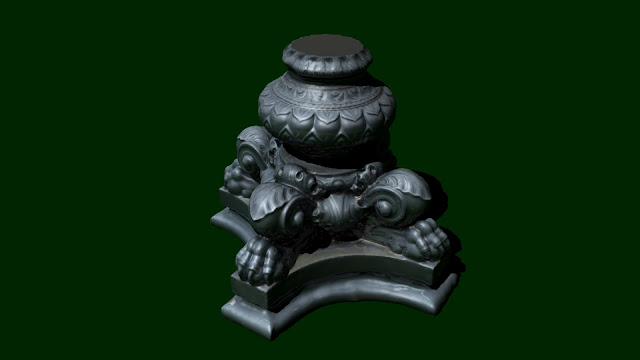
Hello again! A lot of posts today. What a surprise...! This assignment is for Advanced Lighting and Rendering class. We were made to setup a lighting rig using directional lights with less intensity at different angles. I kept 20 directional lights on top and called them SKY LIGHT and 20 directional lights on the bottom and called them GROUND LIGHT. This setup gives a soft light and shadow. Take a look at the results: This render is with Maya's default light. I have not setup any light yet: Here is the render with global light rig setup. You can see a soft light being produced: Here is the render output which is got with the global light rig and a directional light. You can now see a soft light in the previously dark area. A shadow with faded edges can be seen: Model credits goes to Thomas Flynn, you can find the LAMP POST MODEL here: Lamp Post Detail, British Museum That's all for now! Thanks for visiting! Bye!! ~~...
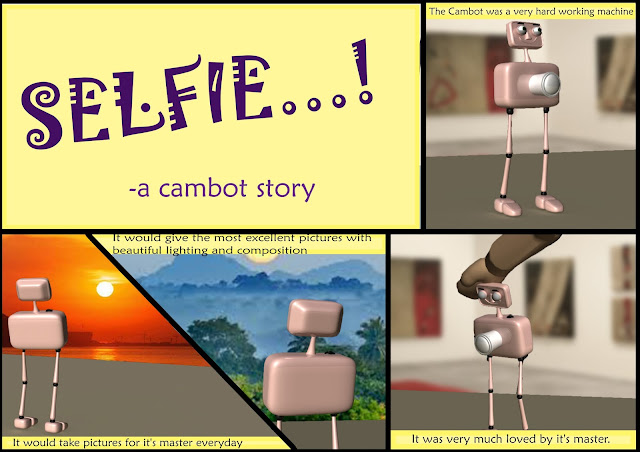
Hello everyone! Here is another character rig. We were given a character called Cambot and told to rig it using the letters of our name as curves. We used IK handles for the legs and Blend shape to give expressions. It was fun. Here are some screenshots: Here is the final output video: Hope you like it! Thanks for visiting! Bye...! ~~~~~~~Chinmayee. S
Hello! This is a small and simple rigging assignment. We were made to rig a tie and make it roll and move around. Here is the final output: Hope you like it! Thanks for visiting! Bye...! ~~~~~~~Chinmayee. S
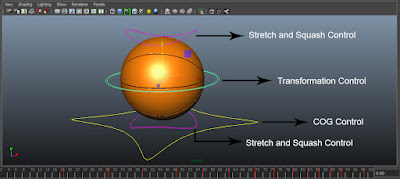
Hello Everyone! This is my first 3D animation. Ball bounce is the animation which forms the basis of all other animations. We were given a ball that was already rigged and told to animate ball bounce. This ball had 4 controls: 1. up_ctrl (stretch and squash control 1) 2. transform_ctrl 3. down_ctrl (stretch and squash control 2) 4. COG_ctrl Using the Transform control, you can move the ball around. I moved the ball in X-axis and made it bounce on Y-axis. Then I made it rotate in the Z-axis. Here is the graph for the Transform control: X-axis: Y-axis: Z-axis: Using the steep-to-curve and curve-to-steep method, editing the graph gave slow in and slow out effect. The Stretch and Squash controls helps you to give the ball the stretch and squash effect, making it look more appealing. Here are the graphs for the controls: Up control X-axis: Up control Y-axis: Down control X-axis: Down control Y-axis: ...
Hey Everyone! It's Inktober...! And I'm finally taking part in it...! What is inktober, you ask? Well, take a look at this video, right here! Basically, you have to draw one drawing per day, for the whole month of October. The drawing should be in Ink. That's all there is to it! Here is my submission for the first day! As Swift As Thought! I used 'Fun Strokes: Pen Brush' and Camel's 'Coloured Drawing Inks' Thanks for visiting!! Bye! ~~~~~~~Chinmayee. S
Hey everyone! This is the final assignment for Character Modeling class. We modeled 3 characters. The first one is Bruce the Shark from 'Finding Nemo': The Second one is Fast Frank from a kids show called 'The Post Train': The Final character was a little dinosaur: That's all for now! Thanks for visiting! Bye! ~~~~~~~Chinmayee. S
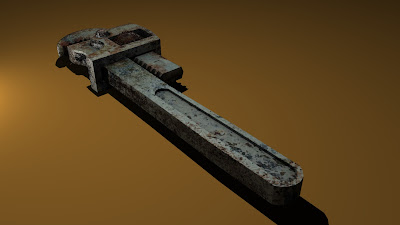
Hey! So, this is the last assignment for this subject. We had to unwrap a tool from our previous assignment and give it some textures. I chose the wrench because it was the best model I had...heh Anyway, I tried to make it look rusty and used. I hope I did it right: Here is the Uv mapping: I used occlusion mapping and added specular mapping to get shadows and shine respectively. Well, that's all for now. Thanks for visiting. Bye! ~~~~~~~Chinmayee. S